PackCheck › Check plugins and mods
Minecraft Plugin Checker: Find Broken Plugins and Mods
Most "my server won't start" problems come from the plugins or mods folder: a missing dependency, a jar for another Minecraft version, the same plugin twice, or a broken download. PackCheck finds them without starting the server.
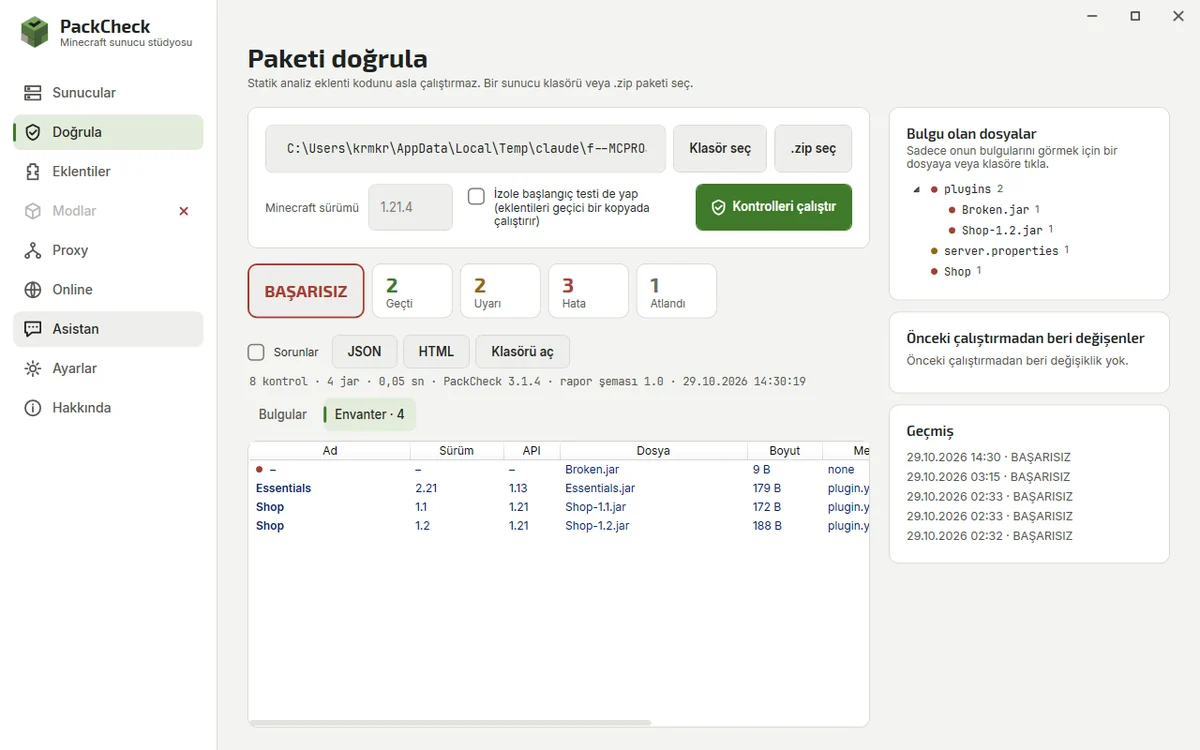
Step by step
- Open Validate. In PackCheck choose Validate, or press Validate on a server.
- Pick the folder or zip. Select the server folder or a pack .zip and, if you know it, the Minecraft version.
- Read the findings. Results are grouped by severity, category or file. Each one shows the evidence (for example the plugin.yml line) and a suggested fix.
- Fix and run again. Install the missing dependency or remove the duplicate, then validate again; the history shows what changed.
What is checked
- Missing required dependencies (plugin.yml depend, mod metadata)
- Plugins built for a newer Minecraft version (api-version), Java version vs Minecraft version
- Duplicate plugins and identical files
- Corrupt or unreadable jars, oversized files, unsafe zip archives
- Client-only mods on a dedicated server, mixed loaders
- server.properties values
Choosing a platform first? Compare them in Paper vs Fabric vs Forge.
Plugin code is never executed for these checks. The same checks run from the command line (packcheck validate) for CI.
Questions
Why does my Minecraft plugin not load?
Common causes: a missing dependency such as Vault or ProtocolLib, a plugin built for another version, or a duplicate. Run Validate to see which.
Does validation run my plugins?
No. Static checks only read files. An optional startup test runs on a throw-away copy, and only when you turn it on.